Querying ShapeContour properties
The ShapeContour provides multiple methods to query its properties.
contour.position()
An example of using .position(t) to query various points on a circle. The argument specifies a point between the beginning (0.0) and the end (1.0) of the contour.
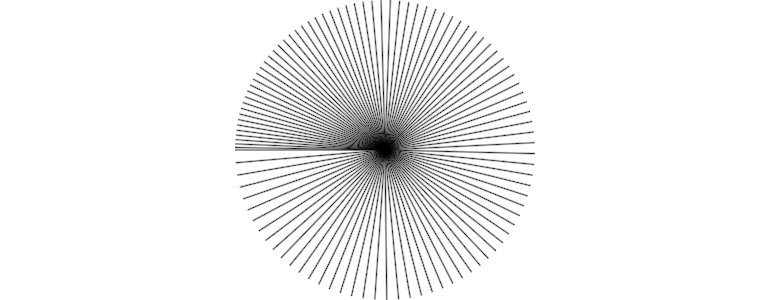
import org.openrndr.application
import org.openrndr.color.ColorRGBa
import org.openrndr.extra.composition.composition
import org.openrndr.extra.composition.drawComposition
import org.openrndr.extra.noise.shapes.uniform
import org.openrndr.extra.noise.uniform
import org.openrndr.extra.shapes.hobbycurve.hobbyCurve
import org.openrndr.extra.shapes.primitives.Pulley
import org.openrndr.extra.shapes.primitives.regularStarRounded
import org.openrndr.extra.shapes.rectify.rectified
import org.openrndr.math.Vector2
import org.openrndr.shape.Circle
import org.openrndr.shape.Rectangle
import org.openrndr.shape.ShapeContour
import kotlin.math.pow

fun main() = application {
    program {
        val myDesign = drawComposition {
            val baseCircle = Circle(drawer.bounds.center, 150.0).contour
            repeat(100) {
                val t = it / 100.0
                segment(baseCircle.position(t.pow(1.3)), drawer.bounds.center)
            }
        }
        extend {
            drawer.clear(ColorRGBa.WHITE)
            drawer.composition(myDesign)
        }
    }
}
contour.equidistantPositions()
An example of using .equidistantPositions() to query a number of points from a contour.
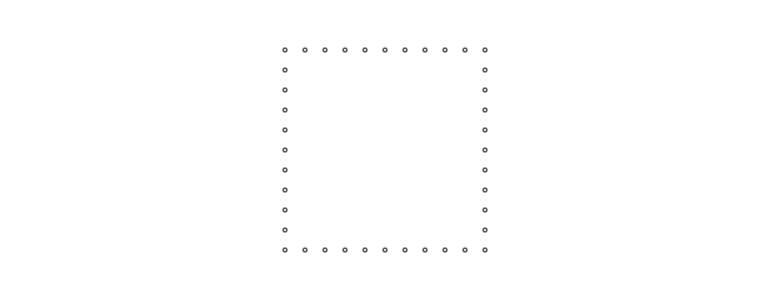
import org.openrndr.application
import org.openrndr.color.ColorRGBa
import org.openrndr.extra.composition.composition
import org.openrndr.extra.composition.drawComposition
import org.openrndr.extra.noise.shapes.uniform
import org.openrndr.extra.noise.uniform
import org.openrndr.extra.shapes.hobbycurve.hobbyCurve
import org.openrndr.extra.shapes.primitives.Pulley
import org.openrndr.extra.shapes.primitives.regularStarRounded
import org.openrndr.extra.shapes.rectify.rectified
import org.openrndr.math.Vector2
import org.openrndr.shape.Circle
import org.openrndr.shape.Rectangle
import org.openrndr.shape.ShapeContour
import kotlin.math.pow

fun main() = application {
    program {
        val myDesign = drawComposition {
            val c = Vector2(width * 0.5, height * 0.5)
            val baseRectangle = Rectangle.fromCenter(c, 200.0).contour
            baseRectangle.equidistantPositions(40).forEach {
                circle(it, 2.0)
            }
        }
        extend {
            drawer.clear(ColorRGBa.WHITE)
            drawer.composition(myDesign)
        }
    }
}
contour.normal()
Querying and visualizing normals in a hobby curve.
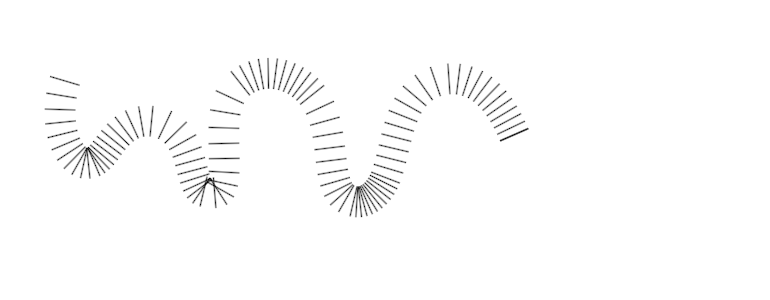
import org.openrndr.application
import org.openrndr.color.ColorRGBa
import org.openrndr.extra.composition.composition
import org.openrndr.extra.composition.drawComposition
import org.openrndr.extra.noise.shapes.uniform
import org.openrndr.extra.noise.uniform
import org.openrndr.extra.shapes.hobbycurve.hobbyCurve
import org.openrndr.extra.shapes.primitives.Pulley
import org.openrndr.extra.shapes.primitives.regularStarRounded
import org.openrndr.extra.shapes.rectify.rectified
import org.openrndr.math.Vector2
import org.openrndr.shape.Circle
import org.openrndr.shape.Rectangle
import org.openrndr.shape.ShapeContour
import kotlin.math.pow

fun main() = application {
    program {
        val myDesign = drawComposition {
            val c = hobbyCurve(List(10) {
                Vector2(50.0 + it * 50.0, height * Double.uniform(0.2, 0.8))
            }, false)
            for (i in 0..100) {
                val t = i / 99.0
                val p = c.position(t)
                val n = c.normal(t)
                segment(p, p + n * 30.0)
            }
        }
        extend {
            drawer.clear(ColorRGBa.WHITE)
            drawer.composition(myDesign)
        }
    }
}
contour.bounds
Querying the bounds of a contour.
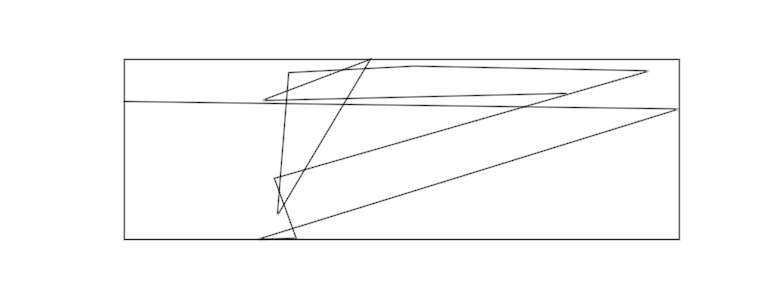
import org.openrndr.application
import org.openrndr.color.ColorRGBa
import org.openrndr.extra.composition.composition
import org.openrndr.extra.composition.drawComposition
import org.openrndr.extra.noise.shapes.uniform
import org.openrndr.extra.noise.uniform
import org.openrndr.extra.shapes.hobbycurve.hobbyCurve
import org.openrndr.extra.shapes.primitives.Pulley
import org.openrndr.extra.shapes.primitives.regularStarRounded
import org.openrndr.extra.shapes.rectify.rectified
import org.openrndr.math.Vector2
import org.openrndr.shape.Circle
import org.openrndr.shape.Rectangle
import org.openrndr.shape.ShapeContour
import kotlin.math.pow

fun main() = application {
    program {
        val myDesign = drawComposition {
            val c = ShapeContour.fromPoints(List(12) {
                drawer.bounds.offsetEdges(-50.0).uniform()
            }, false)
            contour(c)

            contour(c.bounds.contour)
        }
        extend {
            drawer.clear(ColorRGBa.WHITE)
            drawer.composition(myDesign)
        }
    }
}
contour.nearest()
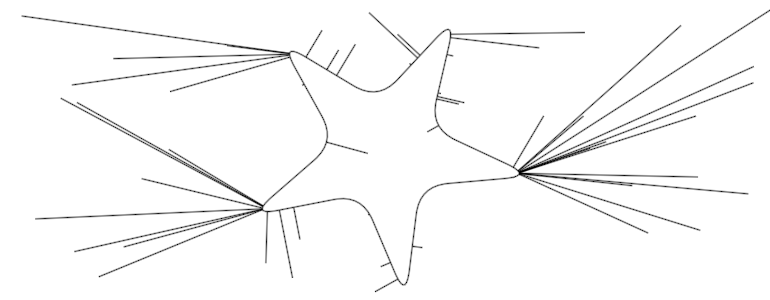
Choose random points in the canvas and connect them to the nearest point in the contour:
import org.openrndr.application
import org.openrndr.color.ColorRGBa
import org.openrndr.extra.composition.composition
import org.openrndr.extra.composition.drawComposition
import org.openrndr.extra.noise.shapes.uniform
import org.openrndr.extra.noise.uniform
import org.openrndr.extra.shapes.hobbycurve.hobbyCurve
import org.openrndr.extra.shapes.primitives.Pulley
import org.openrndr.extra.shapes.primitives.regularStarRounded
import org.openrndr.extra.shapes.rectify.rectified
import org.openrndr.math.Vector2
import org.openrndr.shape.Circle
import org.openrndr.shape.Rectangle
import org.openrndr.shape.ShapeContour
import kotlin.math.pow

fun main() = application {
    program {
        val myDesign = drawComposition {
            val c = regularStarRounded(5, 50.0, 150.0, 0.5, 0.5, drawer.bounds.center, 10.0)
            contour(c)

            List(50) {
                drawer.bounds.uniform()
            }.forEach {
                val p = c.nearest(it)
                segment(p.position, it)
            }
        }
        extend {
            drawer.clear(ColorRGBa.WHITE)
            drawer.composition(myDesign)
        }
    }
}
contour.rectified()
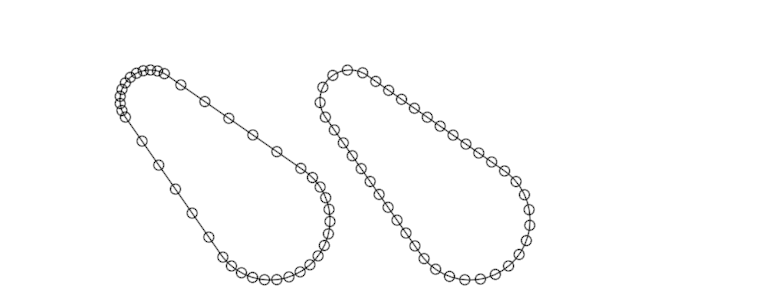
The ut argument in the ShapeContour.position() and ShapeContour.normal() methods does not specify a linear position between the start and the end of the contour.
By using rectified contours (defined in orx-shapes) we can work with evenly spaced points on contours, or animate elements traveling on a contour at the desired speed even if the contour segments vary greatly in length.
import org.openrndr.application
import org.openrndr.color.ColorRGBa
import org.openrndr.extra.composition.composition
import org.openrndr.extra.composition.drawComposition
import org.openrndr.extra.noise.shapes.uniform
import org.openrndr.extra.noise.uniform
import org.openrndr.extra.shapes.hobbycurve.hobbyCurve
import org.openrndr.extra.shapes.primitives.Pulley
import org.openrndr.extra.shapes.primitives.regularStarRounded
import org.openrndr.extra.shapes.rectify.rectified
import org.openrndr.math.Vector2
import org.openrndr.shape.Circle
import org.openrndr.shape.Rectangle
import org.openrndr.shape.ShapeContour
import kotlin.math.pow

fun main() = application {
    program {
        val c = Pulley(Circle(Vector2.ZERO, 30.0), Circle(Vector2.ONE * 120.0, 60.0)).contour
        val cr = c.rectified()

        val myDesign = drawComposition {
            translate(150.0, 100.0)
            contour(c)
            repeat(40) {
                val t = it / 40.0
                // query a position in the contour
                circle(c.position(t), 5.0)
            }

            translate(200.0, 0.0)
            contour(c)
            repeat(40) {
                val t = it / 40.0
                // query a position in the rectified contour
                circle(cr.position(t), 5.0)
            }
        }

        extend {
            drawer.clear(ColorRGBa.WHITE)
            drawer.composition(myDesign)
        }
    }
}