Curves and shapes
OPENRNDR offers a lot of tools for creating and drawing two dimensional shapes.
Segment
The basic element for constructing shapes is the Segment: a Bézier curve with a start point, zero, one or two control points and an end point.
In the previous chapter we learned how to use it for creating straight contours.
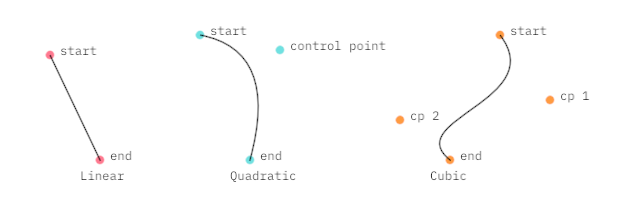
Constructing segments
import org.openrndr.application
import org.openrndr.color.ColorRGBa
import org.openrndr.draw.loadFont
import org.openrndr.extra.composition.composition
import org.openrndr.extra.composition.drawComposition
import org.openrndr.extra.shapes.hobbycurve.hobbyCurve
import org.openrndr.math.Vector2
import org.openrndr.shape.*
import kotlin.math.sin

// Linear Segment: start point, end point
val seg1 = Segment2D(Vector2(50.0, 55.0), Vector2(100.0, 160.0))

// Quadratic Segment: start point, control point, end point
val seg2 = Segment2D(Vector2(200.0, 35.0), Vector2(280.0, 50.0), Vector2(250.0, 160.0))

// Cubic Segment: start point, control point, control point, end point
val seg3 = Segment2D(Vector2(500.0, 35.0), Vector2(550.0, 100.0), Vector2(400.0, 120.0), Vector2(450.0, 160.0))
ShapeContour
A ShapeContour is a collection of Segment instances in which each segment ends where the next one starts. A ShapeContour can be closed like the letter O or open like the letter S. It can be used to describe simple shapes like a square, or more complex ones.
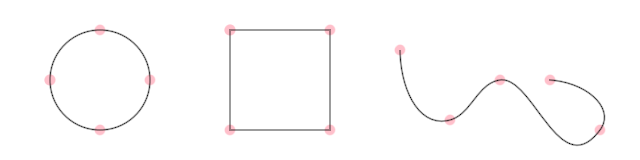
Three ShapeContours with 4 segments each. The one on the right is open.
Constructing a ShapeContour from primitives
Segment, Circle and Rectangle can be easily be converted to contours.
I like working with contours because they have many interesting methods to query their properties and to apply transformations, which we will discover in next sections. As an appetizer, here we create three different contours and draw a section of each.

import org.openrndr.application
import org.openrndr.color.ColorRGBa
import org.openrndr.draw.loadFont
import org.openrndr.extra.composition.composition
import org.openrndr.extra.composition.drawComposition
import org.openrndr.extra.shapes.hobbycurve.hobbyCurve
import org.openrndr.math.Vector2
import org.openrndr.shape.*
import kotlin.math.sin

fun main() = application {
    program {
        val s = Segment2D(drawer.bounds.center - 100.0, drawer.bounds.center + 100.0).contour
        val c = Circle(drawer.bounds.center, 100.0).contour
        val r = Rectangle.fromCenter(drawer.bounds.center, 100.0).contour

        val myContours = listOf(s, c, r)

        val myDesign = drawComposition {
            contours(myContours.map {
                it.sub(0.1, 0.9)
            })
        }

        extend {
            drawer.clear(ColorRGBa.WHITE)
            drawer.composition(myDesign)
        }
    }
}
Constructing a ShapeContour from points
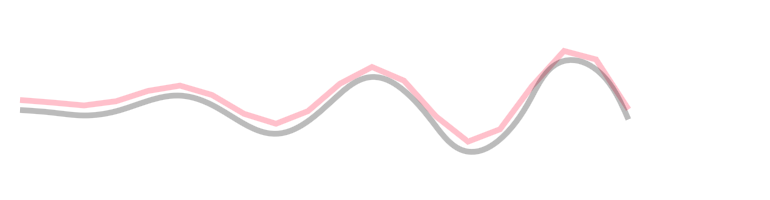
We can use .fromPoints() to connect points with straight segments.
The hobbyCurve method, found in orx-shapes, can be used to create smooth curves.
import org.openrndr.application
import org.openrndr.color.ColorRGBa
import org.openrndr.draw.loadFont
import org.openrndr.extra.composition.composition
import org.openrndr.extra.composition.drawComposition
import org.openrndr.extra.shapes.hobbycurve.hobbyCurve
import org.openrndr.math.Vector2
import org.openrndr.shape.*
import kotlin.math.sin

fun main() = application {
    program {
        val points = List(20) {
            Vector2(20.0 + it * 32.0, 100.0 + sin(it * 1.0) * it * 3)
        }
        val wavyContour = ShapeContour.fromPoints(points, closed = false)
        val smoothContour = hobbyCurve(points, closed = false)

        extend {
            drawer.clear(ColorRGBa.WHITE)
            drawer.fill = null
            drawer.strokeWeight = 5.0
            drawer.stroke = ColorRGBa.PINK
            drawer.contour(wavyContour)

            drawer.translate(0.0, 10.0) // displace 10px down
            drawer.stroke = ColorRGBa.BLACK.opacify(0.5)
            drawer.contour(smoothContour)
        }
    }
}