Drawing text
OPENRNDR comes with support for rendering bitmap text, but for plotting purposes we are more interested in font contours.
Working with text contours
To load the vector data of a font file use the loadFace() method, then call the .glyphForCharacter() method to obtain a Shape representing a character.
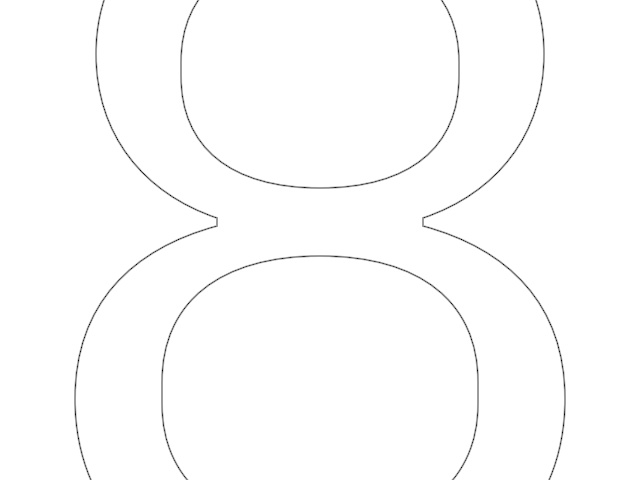
import org.openrndr.application
import org.openrndr.color.ColorRGBa
import org.openrndr.draw.font.loadFace
import org.openrndr.extra.composition.composition
import org.openrndr.extra.composition.drawComposition
import org.openrndr.extra.shapes.rectify.rectified
import org.openrndr.shape.LineSegment

fun main() = application {
    program {
        val face = loadFace("data/fonts/default.otf")
        val shape = face.glyphForCharacter(character = '8').shape(1.0)

        val myDesign = drawComposition {
            // Center the shape
            translate(drawer.bounds.center - shape.bounds.center)
            fill = null

            // Draw each contour found in the character '8' with a different color
            shape.contours.forEach {
                contour(it)
            }
        }

        extend {
            drawer.clear(ColorRGBa.WHITE)
            drawer.composition(myDesign)
        }
    }
}
This example visualizes normal vectors around the contour of the character ‘8’, evenly spaced every 10 pixels.
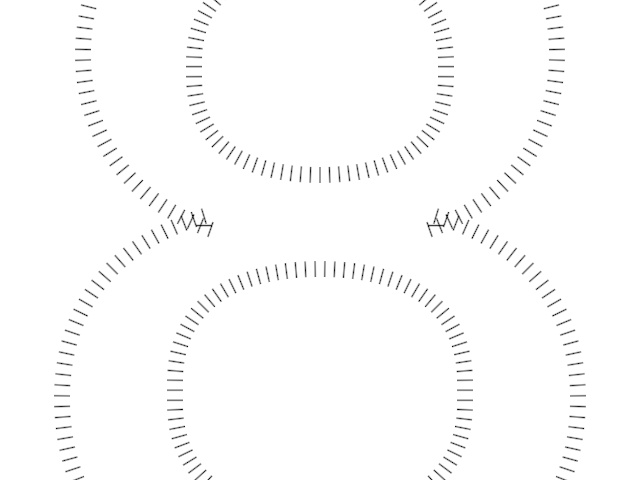
import org.openrndr.application
import org.openrndr.color.ColorRGBa
import org.openrndr.draw.font.loadFace
import org.openrndr.extra.composition.composition
import org.openrndr.extra.composition.drawComposition
import org.openrndr.extra.shapes.rectify.rectified
import org.openrndr.shape.LineSegment

fun main() = application {
    program {
        val face = loadFace("data/fonts/default.otf")
        val shape = face.glyphForCharacter('8').shape(1.0)

        // Map each contour in the shape to a list of LineSegment,
        // then combine the resulting lists into one list by calling `.flatten()`.
        val normals = shape.contours.map { c ->
            // Work with rectified contours so `t` values are evenly spaced.
            val rc = c.rectified()
            val stepCount = (c.length / 10).toInt()
            List(stepCount) {
                val t = it / stepCount.toDouble()
                LineSegment(rc.position(t) + rc.normal(t) * 5.0, rc.position(t) + rc.normal(t) * 20.0)
            }
        }.flatten()

        val myDesign = drawComposition {
            translate(drawer.bounds.center - shape.bounds.center)
            lineSegments(normals)
        }
        extend {
            drawer.clear(ColorRGBa.WHITE)
            drawer.composition(myDesign)
        }
    }
}